Every checkout, ready to work.
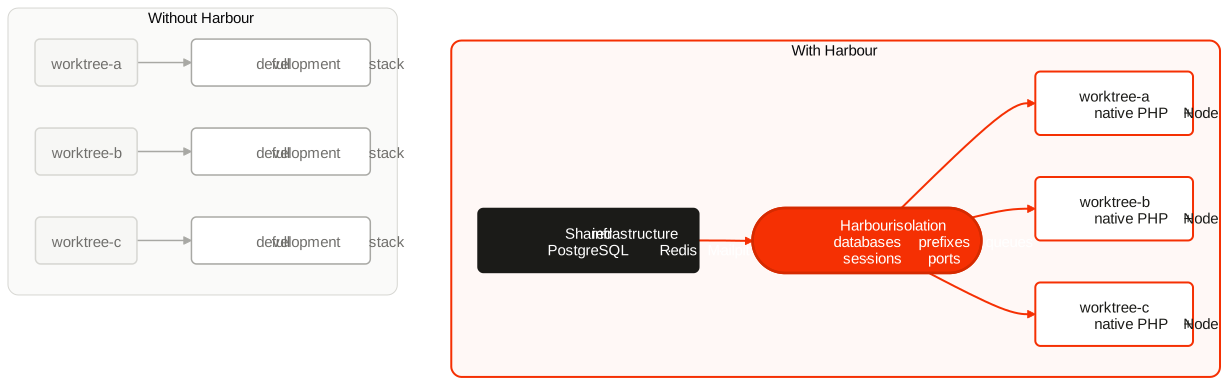
Harbour gives each Laravel clone or Git worktree its own ports, database, Redis namespaces, sessions, queues, Vite state, and optional Docker resources—while shared infrastructure stays shared.
Lightweight
Run PHP and Node natively. Reuse PostgreSQL, Redis, Mailpit, and other infrastructure.
Isolated
Databases, ports, queues, cache, sessions, and Vite hot files stay workspace-specific.
Safe teardown
Harbour removes only resources backed by persisted ownership evidence.
The everyday workflow
Project maintainers install Harbour once:
composer require --dev pickeringtech/harbour
php artisan workspace:install
The install command first asks whether to detect Sail, Compose, Herd, and Laravel environment choices or let you choose components manually. Manual mode uses a multi-select for optional services and can generate and start a workspace-owned Docker Compose stack. With no existing infrastructure, detection offers a zero-dependency SQLite/file/log setup.
After those generated project files are reviewed and committed, a developer uses:
composer install
composer workspace:dev
composer install installs the checkout's PHP dependencies. composer workspace:dev creates the isolated environment and launches Laravel plus Vite
in one attached session. Agents or IDEs with their own process orchestration use
composer workspace:setup instead.
When the checkout is about to be removed:
composer workspace:teardown -- --force
This removes Harbour-owned resources and restores the .env that existed before setup. --force skips the prompt; it never bypasses ownership checks.
Clear ownership boundaries
Harbour does not create worktrees, manage branches or agents, install PHP or Node runtimes, or run background application daemons. Git, Orca, Herdr, and humans own the checkout. Harbour owns the Laravel environment inside it and can keep Laravel plus Vite attached to a developer's current terminal.
Learn by concern
- Workspaces explains identity, concurrency, setup, and teardown.
- Databases and Laravel state cover isolation.
- Vite and Reverb removes the usual multi-worktree port and hot-file friction.
- Docker and Docker Compose remain optional resource providers.
- Safety explains the evidence required before Harbour deletes anything.